
Aline
A clip-on sensor that tells you when you’re sitting too close to your screen.
ROLE
UX Research
Co-Design Production
Physical Prototype
TEAM
04 Designers
METHODS
User Research
Physical Prototyping
Digital Rendering
Video Prototype
DELIVERABLE
Digital Rendering
01
PROBLEM
Hours at a laptop
add up. Often,
the strain comes
down to how
close you sit.
Prolonged computer use frequently results in digital eye strain and musculoskeletal discomfort, often caused by poor ergonomics and improper screen distance
(Reddy et al., 2013) - Inspired by UN Sustainable Development Goal 3: Good Health and well being
02
CONCEPT
FIG. 01 - INITIAL CONCEPT SKETCHES
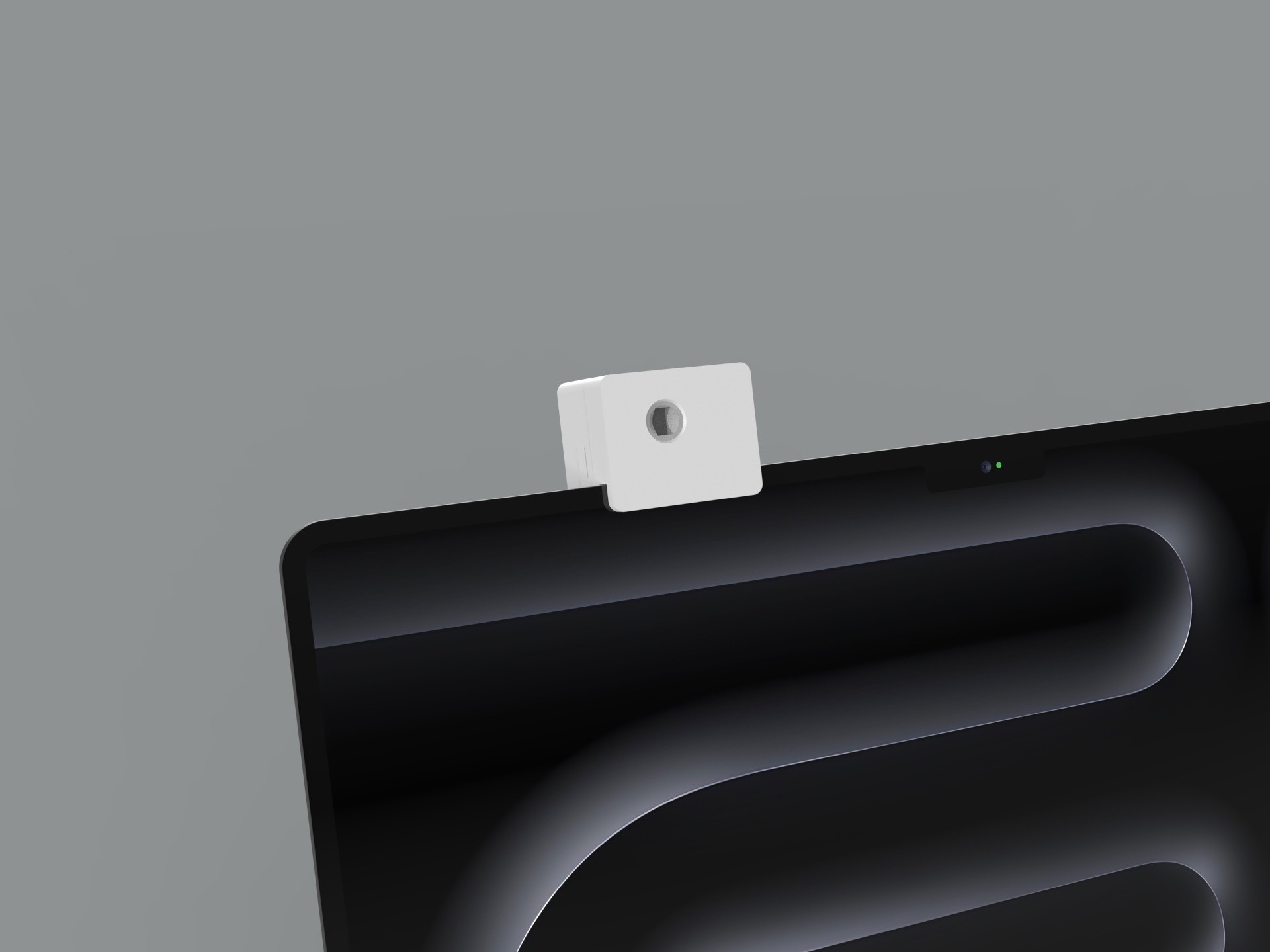
A webcam-sized sensor that clips to the screen and stays out of the way.
It detects how close you are to your laptop and triggers an on-screen alert when you lean in too far. Because clip-on devices can feel distracting or unconventional, we designed both the physical form and the digital interface to be as unobtrusive as possible.
03
PROCESS
Four Prototypes,
each one built
on the last.
With a three-person team, we chose four methods that complemented one another, each aimed at a different question about the product.
STEP 01
Cardboard
TESTS: SIZE & SHAPE
A quick way to turn the sketch dimensions into a form we could hold before modeling.
STEP 02
3D Model
TESTS: PHYSICAL DESIGN
We designed and printed our own housing so we had full control over the object at the center of the test.
STEP 03
Wizard of Oz
TESTS: BEHAVIOR &
DESIRABILITY
A behavioral test that let us watch real interactions as if the device already worked.
STEP 04
Video
TESTS: PERCEIVED IMPACT
A two-minute film of the problem and the product in use, shown to viewers for feedback.
04
WIZARD OF OZ TEST
We faked the sensor. Nobody could tell.
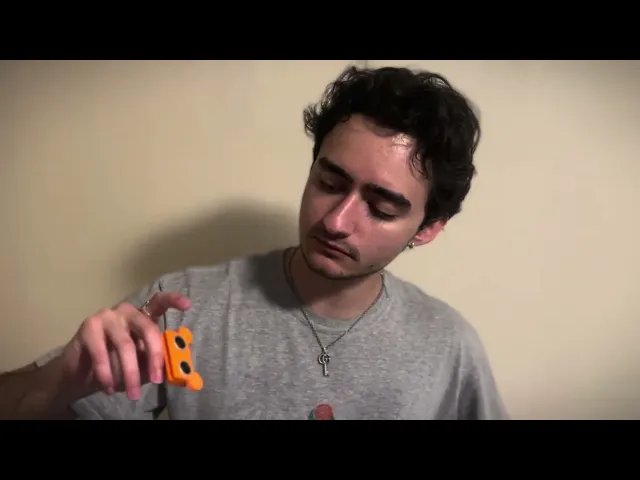
Building real sensing was beyond the scope of the course, so we simulated it. A 3D-printed housing on an inactive Arduino gave participants something real to look at, while a teammate triggered the alert by hand.
HOW THE TEST WAS RIGGED
PARTICIPANT
Leans in to read small text
FACILITATOR
Watches from across the table
HIDDEN TRIGGER
Bluetooth keyboard keybind
BETTERTOUCHTOOL
Software triggered alert overlay
TEST PROTOCOL
PARTICIPANTS
3
ROUNDS
3 - both webcam versions, then each one alone
TIME LIMIT
90s
MEASURED
Posture changes, response time, interview answers
QUESTIONS WE ASKED AFTER
01
How would you rate your overall first impression of the model’s look and quality on the laptop? (1–7)
02
Would you feel comfortable leaving this model attached to your laptop for long periods?
03
How easy or difficult was it to complete the task without thinking about the webcam?
04
Do you believe this alert system could improve your posture or reduce strain over time?
05
Did the webcam’s size or position interfere with your use of the laptop?
FINDINGS
“It would probably help my posture
a bunch.”
PARTICIPANT, BEHAVIORAL TEST
3 / 3
participants said it did what it set out to do and wanted to use it day to day
5 - 6
most common value rating: “simple but effective”
4 - 6
quality rating out of 7, fair for a low fidelity build
WHAT WORKED
Orange and red warnings prompted people to hold their distance and stay aware of their posture
Participants understood the intended function despite the low fidelity
The reveal drew shock and amusement: the manual trigger felt real
WHAT DIDN’T
The alert was hard to notice once someone was already too close
Some worried they’d get used to it over time
Visible sensors felt intimidating to some people
04
VIDEO PROTOTYPE
Two minutes to
show the problem
and the fix.
We refined the webcam’s design and the on-screen alerts for clarity and responsiveness, then filmed the product in use. Viewers called the webcam clean and appealing and said the film captured its purpose.
06
EMBEDDED SYSTEMS
Then I built the
sensor for real.
A new iteration that integrates hardware and firmware, so the device senses proximity and triggers posture feedback on its own, without external simulation tools.

MICROCONTROLLER
Adafruit QT Py SAMD21
Compact form factor, accessible GPIO pins and reliable processing for rapid prototyping.

SENSOR
VL53L4CD time-of-flight
High-precision proximity detection, low latency and a small footprint. ±1 mm precision, up to ~1,200 mm indoors.
SIGNAL PATH
01
Tof sensor
Measures distance to the user
02
QT Py
CircuitPython maps distance to a state
03
Serial
Prints SAFE, MID, or CLOSE
04
Python bridge
Fires a trigger when the state changes
05
BetterTouchTool
Shows the green, yellow, or red HUD


ON / OFF SWITCH
A BetterTouchTool shortcut runs a shell script: if the bridge is running it stops it, otherwise it launches a fresh background instance.
⌘
⇧
F
Wiring · I²C over STEMMA QT
QT Py 3V
VL53L4CD VIN
QT Py GND
VL53L4CD GND
QT Py SDA
VL53L4CD SDA
QT Py SCL
VL53L4CD SCL
Powered by 5V from the laptop over USB-C

DISTANCE THRESHOLDS
Placeholder values based on common ergonomic guidelines
SAFE
> 50 mm
Healthy viewing distance
MID
30-50 mm
Healthy viewing distance
CLOSE
< 30 mm
Healthy viewing distance
07
ENCLOSURE
Small enough to
forget it’s there
Rounded edges and a clean silhouette let it sit naturally on the top edge of a laptop screen without the bulk of most clip-on peripherals.

